

Fraudulent emails are targeting website owners with fake SSL renewals, security updates, and website maintenance requests. Here’s how to recognize them and protect your business.
Imagine receiving an email from someone you recognize. It includes their name, photograph, company information, and contact details. They’re warning you about a potential problem with your website and offering to help resolve it.
Sounds legitimate, right?
Not necessarily.
InsideOut Solutions has recently received reports of fraudulent emails sent to website owners by scammers impersonating members of our company, including our president, Patricia McCauley.
These messages claim that websites require SSL certificate renewals, security updates, or other technical maintenance. They may look convincing, but they are not from InsideOut Solutions.
Most importantly: Do not send money, provide payment information, or authorize unexpected website services without first verifying the request directly with us.
What Is Phishing?
Phishing is a type of online scam in which criminals impersonate trusted individuals or organizations to trick recipients into sharing sensitive information, clicking malicious links, or sending money.
The scammers might pretend to represent your bank, an online service, your email provider, or even the company managing your website.
These messages often create a sense of urgency. Your account is about to be suspended. Your domain is expiring. Your website needs an immediate security update.
The goal is to convince you to act before you have time to question whether the message is legitimate.
In this latest incident, scammers are attempting to exploit the trust our clients have placed in InsideOut Solutions.
A Real Example: Fake Emails from InsideOut Solutions
One of the fraudulent messages reported to us appeared to come from Patricia McCauley, president of InsideOut Solutions.
It included her photograph, company branding, and a professional-looking email signature. The message claimed that the recipient’s website needed an SSL/TLS certificate renewal and security update.
The email didn’t immediately demand payment. Instead, it asked the recipient to approve the supposed technical work, after which the sender would provide a service fee and payment instructions.
This is an important tactic to recognize. Scammers don’t always ask for money right away. Sometimes they first try to establish a conversation and gain your trust.
Let’s examine some of the warning signs in this actual fraudulent message.
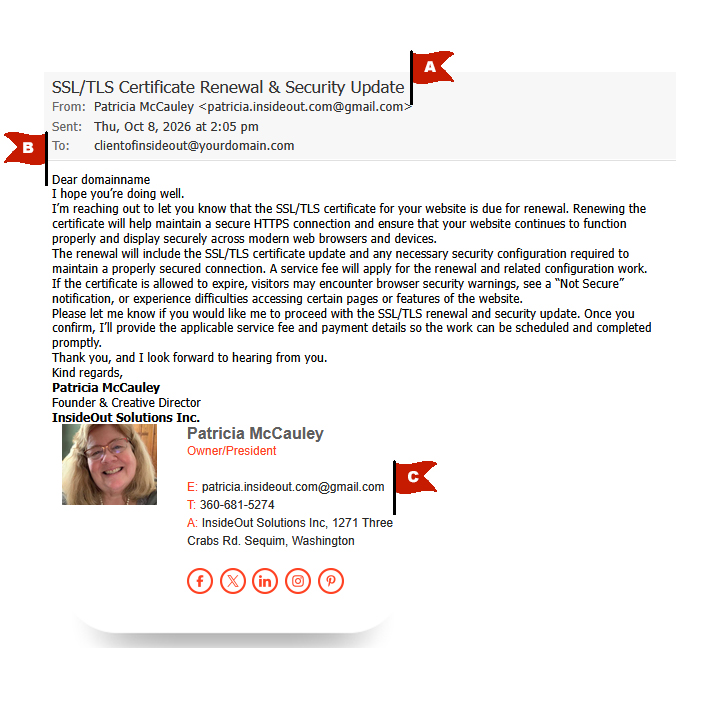
Red flags in the example above:
A: The actual sending domain is Gmail
The sender is not emailing from an official InsideOut Solutions address. Although the email address contains insideout.com, the actual domain after the @ symbol is gmail.com. This is the strongest warning sign in this example and something you should always check when receiving an unexpected email.
B: The greeting is generic
This example message begins with “Dear domainname” rather than addressing a real person. This suggests the sender may be working from a list of website domains rather than communicating with a known contact.
C: The signature and contact details do not match InsideOut Solutions
Several details in the signature are incorrect or inconsistent:
- The phone number is not InsideOut Solutions’ phone number.
- The message does not direct recipients to verify the request through our official website,
insideout.com. - The signature includes social media branding and links that do not match InsideOut’s real online presence.
Not every phishing email will contain all these warning signs. Some fraudulent messages are much more convincing, which is why independently verifying unexpected requests is so important.
We’re Not the Only Company Being Targeted
We’ve also learned of similar impersonation attempts involving other website design and marketing agencies.
These messages have claimed that websites need urgent WordPress compliance updates, plugin installations, API renewals, SSL certificate renewals, and other technical services.
Some threaten that a website could be restricted or taken offline if the recipient doesn’t respond quickly.
The details vary, but the approach is the same: impersonate a trusted service provider, invent a technical problem, and encourage the website owner to authorize work or make a payment.
Why Your Business Email Address Matters
We’ve written before about the importance of using a professional email address to boost your credibility, and this scam provides a perfect example of why it matters.
Consider these two addresses:
innkeeper@yourinn.com
yourinnreservations@yahoo.com
Both could belong to legitimate businesses, but the first clearly connects the sender to the business’s website. That consistency helps customers recognize communications from the company they’re dealing with.
Now imagine receiving an unexpected invoice from someone claiming to represent your website hosting provider, but the message comes from a personal Gmail, Yahoo, or Comcast address.
That should raise a red flag, especially if the message requests money, passwords, or urgent action.
Some businesses maintain professional email addresses associated with their websites but forward incoming messages to personal email accounts. While forwarding can be convenient, responding from the personal account can undermine the credibility established by the professional address.
Whenever possible, businesses should send and reply to customer communications using their own domain-based email addresses.
Of course, a professional-looking email address is not an absolute guarantee of authenticity. Email accounts can be compromised, sender addresses can be spoofed, and scammers can register domains that closely resemble legitimate businesses.
That’s why verifying unexpected requests is important, even when the sender appears familiar.
How to Recognize a Suspicious Email
Whether a message claims to come from InsideOut Solutions, your bank, or another business you trust, watch for these warning signs.
1. Check the actual sender address.
Don’t rely on the displayed name or company logo. Examine the complete email address, particularly the domain after the @ symbol.
Official InsideOut Solutions communications come from our @insideout.com domain. We do not use personal Gmail accounts to request payments for website maintenance.
2. Be suspicious of unexpected urgency.
Warnings that your website will be shut down, your domain will expire immediately, or your account will be suspended unless you act quickly deserve extra scrutiny.
3. Question unexpected charges.
If someone contacts you about an unfamiliar renewal fee, security service, or technical update, verify that the work is actually needed and that the person requesting payment is authorized to do so.
4. Don’t trust appearances alone.
Photographs, signatures, logos, job titles, and company information can all be copied or recreated. A convincing email signature is not proof that the sender is legitimate.
5. Verify links and payment instructions.
A link that looks like it leads to a familiar website may actually direct you somewhere else. Rather than following a suspicious email link, visit the company’s known website independently.
Yes, InsideOut Solutions Does Contact Clients by Email!
It’s important to understand that not every email about website maintenance, security updates, or billing is a scam.
InsideOut Solutions regularly communicates with clients by email. We may contact you about an outstanding invoice, an important security update, recommended website improvements, or services that require your attention.
These are normal parts of managing and maintaining your website.
The goal isn’t to make you suspicious of every email you receive. It’s to help you recognize when a message deserves a closer look.
A legitimate request may sometimes be unexpected, and it may involve additional fees. That alone doesn’t make it fraudulent.
What matters is verifying that the request actually came from InsideOut Solutions before providing sensitive information, authorizing unfamiliar work, or making a payment.
If you’re ever uncertain, please call us using the phone number published on insideout.com. We’ll gladly confirm whether the message is legitimate and explain what, if anything, needs your attention.
When in doubt, verify — don’t simply ignore it.
What Should You Do If You Receive One of These Emails?
If you receive an unexpected message claiming to be from InsideOut Solutions about website maintenance, security, renewals, or payment:
- Do not send money or provide payment information until you’ve verified the request.
- Do not click unfamiliar links or open unexpected attachments.
- Do not provide passwords or other sensitive account information.
- Do not authorize unexpected technical work solely based on an email.
- Contact InsideOut Solutions directly using the phone number listed on our official website.
Visit https://insideout.com and call the phone number published there if you have any concerns or questions.
Do not rely on phone numbers, email addresses, or links provided in the suspicious message itself.
If you’ve already responded to one of these emails, please let us know. If you’ve sent money or shared financial information, contact your bank or payment provider promptly.
How Do Scammers Create Such Convincing Emails?
You might wonder how someone pretending to represent InsideOut Solutions could know our president’s name, find her photograph, or identify businesses whose websites we manage.
The answer is that much of this information is publicly available.
Business websites, social media profiles, online directories, and search engines can provide scammers with company names, employee information, photographs, contact details, and even connections between businesses and their website providers.
With that information, someone can create a convincing-looking email address, copy company branding, and put together a professional-looking message that appears to come from a trusted business.
Scammers can also send these messages to large numbers of website owners, hoping that even a small percentage will respond.
A message containing accurate company information doesn’t mean the person sending it actually represents that company.
That’s why it’s so important to verify unexpected requests independently, rather than relying on familiar names, photographs, or professional-looking email signatures.
When in Doubt, Give Us a Call!
Your website is an important part of your business, and legitimate technical issues sometimes do require attention. That’s why it’s important to know who you’re communicating with before approving work or making payments.
If a message doesn’t seem right, or if someone claiming to represent InsideOut Solutions contacts you with an unexpected request, please reach out to us directly.
We’re always happy to help verify whether a communication is legitimate.
More About Protecting Your Business from Phishing
Phishing scams take many forms. For additional information, see our previous articles:
- Phishing Alert: Don’t Get Hooked by Fake Email Warnings
- Don’t Fall for Domain Expiration Scams: Safeguard Your Online Presence
- Using a Professional Email Address to Boost Your Credibility
Remember: A few moments spent verifying an unexpected request could save your business a great deal of trouble.
InsideOut Solutions is here to help. Call or email to discuss your needs with Patricia McCauley pat@insideout.com or 360-683-5774.
More from InsideOut Solutions:
• Website Design
• Print and Graphic Design
• Digital Marketing
• Website Hosting
• View Portfolios
• Contact Us for a FREE Quote!